---
title: Why is there a triangle with an exclamation point on my tab?
description: If you see a triangle with an exclamation point in place of the pages on the right side of the tab this means you have too many files open and app performance may be affected .
---
[Skip to content](https://help.folia.com/knowledge/why-is-there-a-triangle-with-an-exclamation-point-on-my-tab#main-content)
English
Show submenu for translations
[Contact us](https://help.folia.com/knowledge/kb-tickets/new?hsLang=en)
Open main navigation
Close main navigation
- English
Show submenu for translations
- [Contact us](https://help.folia.com/knowledge/kb-tickets/new)
- [Visit folia.com](https://www.folia.com/)
[Visit folia.com](https://www.folia.com/)
How can we help you?
- There are no suggestions because the search field is empty.
1. [Help Center](https://help.folia.com/knowledge?hsLang=en)
2. [iAnnotate](https://help.folia.com/knowledge/iannotate?hsLang=en)
3. [Troubleshooting Tips](https://help.folia.com/knowledge/iannotate?hsLang=en#troubleshooting-tips)
# Why is there a triangle with an exclamation point on my tab?
## If you see a triangle with an exclamation point in place of the pages on the right side of the tab this means you have too many files open and app performance may be affected .
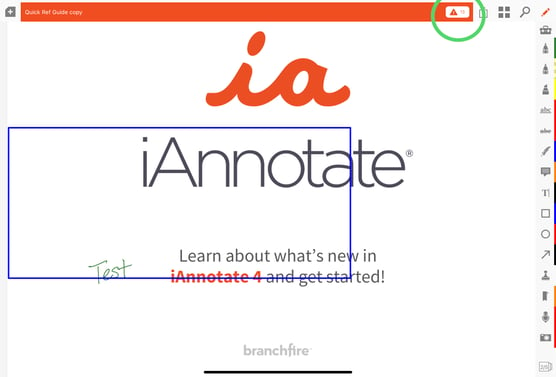
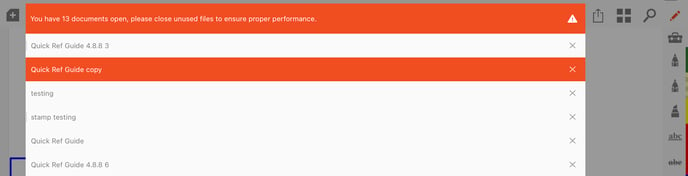
When the multiple tabs along the top turn into one long tab with an exclamation point the app is warning you there are too many documents open and the app's performance could be affected. In this state it is recommended you close as many documents as you can only leaving the documents you are currently working on opened.
To close documents tap the "x' next to the name. The document will not be deleted and can be found in the iAnnotate library when needed.
- [Folia](https://help.folia.com/knowledge/folia?hsLang=en#main-content)
- [Folia: How to](https://help.folia.com/knowledge/folia?hsLang=en#folia-how-to)
- [Folia: Tools](https://help.folia.com/knowledge/folia?hsLang=en#folia-tools)
- [iAnnotate](https://help.folia.com/knowledge/iannotate?hsLang=en#main-content)
- [Product Announcements](https://help.folia.com/knowledge/iannotate?hsLang=en#product-announcements)
- [Guides](https://help.folia.com/knowledge/iannotate?hsLang=en#guides)
- [Using Storage Connections](https://help.folia.com/knowledge/iannotate?hsLang=en#using-storage-connections)
- [Purchasing the App](https://help.folia.com/knowledge/iannotate?hsLang=en#purchasing-the-app)
- [Tool Tips](https://help.folia.com/knowledge/iannotate?hsLang=en#tool-tips)
- [Tips And Tricks](https://help.folia.com/knowledge/iannotate?hsLang=en#tips-and-tricks)
- [Offline Access](https://help.folia.com/knowledge/iannotate?hsLang=en#offline-access)
- [Troubleshooting Tips](https://help.folia.com/knowledge/iannotate?hsLang=en#troubleshooting-tips)
- [Moving from Version 3 to Version 4](https://help.folia.com/knowledge/iannotate?hsLang=en#moving-from-version-3-to-version-4)
- [iAnnotate for Enterprise](https://help.folia.com/knowledge/iannotate-for-enterprise?hsLang=en#main-content)
- [iAnnotate for Intune](https://help.folia.com/knowledge/iannotate-for-enterprise?hsLang=en#iannotate-for-intune)
- [Other Enterprise Solutions](https://help.folia.com/knowledge/iannotate-for-enterprise?hsLang=en#other-enterprise-solutions)
- [iAnnotate Version 3](https://help.folia.com/knowledge/iannotate-version-3?hsLang=en#main-content)
- [Version 3](https://help.folia.com/knowledge/iannotate-version-3?hsLang=en#version-3)
# Folia
folia.com Help Center
Copyright © 2026, Folia