---
title: Using the Eraser in iAnnotate
description: iAnnotate has an eraser built into the the pencil tool. There is not a separate eraser tool available on the toolbar.
---
[Skip to content](https://help.folia.com/knowledge/eraser#main-content)
English
Show submenu for translations
[Contact us](https://help.folia.com/knowledge/kb-tickets/new?hsLang=en)
Open main navigation
Close main navigation
- English
Show submenu for translations
- [Contact us](https://help.folia.com/knowledge/kb-tickets/new)
- [Visit folia.com](https://www.folia.com/)
[Visit folia.com](https://www.folia.com/)
How can we help you?
- There are no suggestions because the search field is empty.
1. [Help Center](https://help.folia.com/knowledge?hsLang=en)
2. [iAnnotate](https://help.folia.com/knowledge/iannotate?hsLang=en)
3. [Tool Tips](https://help.folia.com/knowledge/iannotate?hsLang=en#tool-tips)
# Using the Eraser in iAnnotate
## iAnnotate has an eraser built into the the pencil tool. There is not a separate eraser tool available on the toolbar.
When the pencil tool is active, a horizontal menu specific to that annotation will appear in the top right. The eraser is accessible from this menu. ([Jump to the video showing this action.](https://help.folia.com/knowledge/eraser#eraser_video))

If you are not currently in pencil mode, you can edit any existing annotation. Tap on the annotation and it will allow the annotation to become editable. You will then notice the menu specific to that annotation as a horizontal bar in the top right.
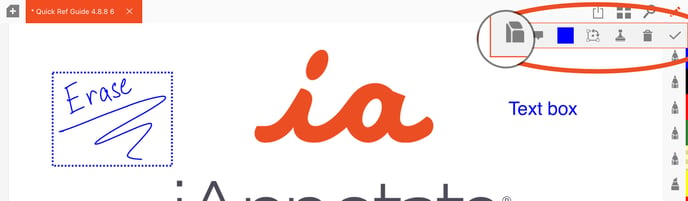
To use the eraser, tap on the eraser icon. You can begin to rub the area you want removed on the page. The diameter of the eraser can be adjusted by sliding the bar now seen in the annotation specific menu. Once you are finished you can tap the check mark to exit or select one of the other options in the annotation specific menu. If you tap the pencil, for example, you will be able to continue making annotations with the pencil rather than starting a new pencil annotation.
Need help with using the eraser? Reach out to our team at [help@folia.com.](mailto:help@folia.com)
---
*Updated: May 2024*
- [Folia](https://help.folia.com/knowledge/folia?hsLang=en#main-content)
- [Folia: How to](https://help.folia.com/knowledge/folia?hsLang=en#folia-how-to)
- [Folia: Tools](https://help.folia.com/knowledge/folia?hsLang=en#folia-tools)
- [iAnnotate](https://help.folia.com/knowledge/iannotate?hsLang=en#main-content)
- [Product Announcements](https://help.folia.com/knowledge/iannotate?hsLang=en#product-announcements)
- [Guides](https://help.folia.com/knowledge/iannotate?hsLang=en#guides)
- [Using Storage Connections](https://help.folia.com/knowledge/iannotate?hsLang=en#using-storage-connections)
- [Purchasing the App](https://help.folia.com/knowledge/iannotate?hsLang=en#purchasing-the-app)
- [Tool Tips](https://help.folia.com/knowledge/iannotate?hsLang=en#tool-tips)
- [Tips And Tricks](https://help.folia.com/knowledge/iannotate?hsLang=en#tips-and-tricks)
- [Offline Access](https://help.folia.com/knowledge/iannotate?hsLang=en#offline-access)
- [Troubleshooting Tips](https://help.folia.com/knowledge/iannotate?hsLang=en#troubleshooting-tips)
- [Moving from Version 3 to Version 4](https://help.folia.com/knowledge/iannotate?hsLang=en#moving-from-version-3-to-version-4)
- [iAnnotate for Enterprise](https://help.folia.com/knowledge/iannotate-for-enterprise?hsLang=en#main-content)
- [iAnnotate for Intune](https://help.folia.com/knowledge/iannotate-for-enterprise?hsLang=en#iannotate-for-intune)
- [Other Enterprise Solutions](https://help.folia.com/knowledge/iannotate-for-enterprise?hsLang=en#other-enterprise-solutions)
- [iAnnotate Version 3](https://help.folia.com/knowledge/iannotate-version-3?hsLang=en#main-content)
- [Version 3](https://help.folia.com/knowledge/iannotate-version-3?hsLang=en#version-3)
# Folia
folia.com Help Center
Copyright © 2026, Folia
```json
{
"@context" : "https://schema.org",
"@type" : "VideoObject",
"caption" : {
"@type" : "MediaObject",
"contentUrl" : "https://help.folia.com/media-transcripts/99876124201/en.vtt",
"inLanguage" : "en",
"name" : "en Captions"
},
"contentUrl" : "https://21630304.fs1.hubspotusercontent-na1.net/hubfs/21630304/iAnnotate%20erase.mov",
"dateModified" : "2025-10-29T15:30:29.615Z",
"duration" : "PT32.565S",
"height" : 1300,
"name" : "iAnnotate erase",
"thumbnailUrl" : "https://21630304.fs1.hubspotusercontent-na1.net/hubfs/21630304/iAnnotate%20erase.mov/medium.jpg",
"uploadDate" : "2023-01-25T15:55:20.056Z",
"width" : 1920
}
```